
1
Play as normal
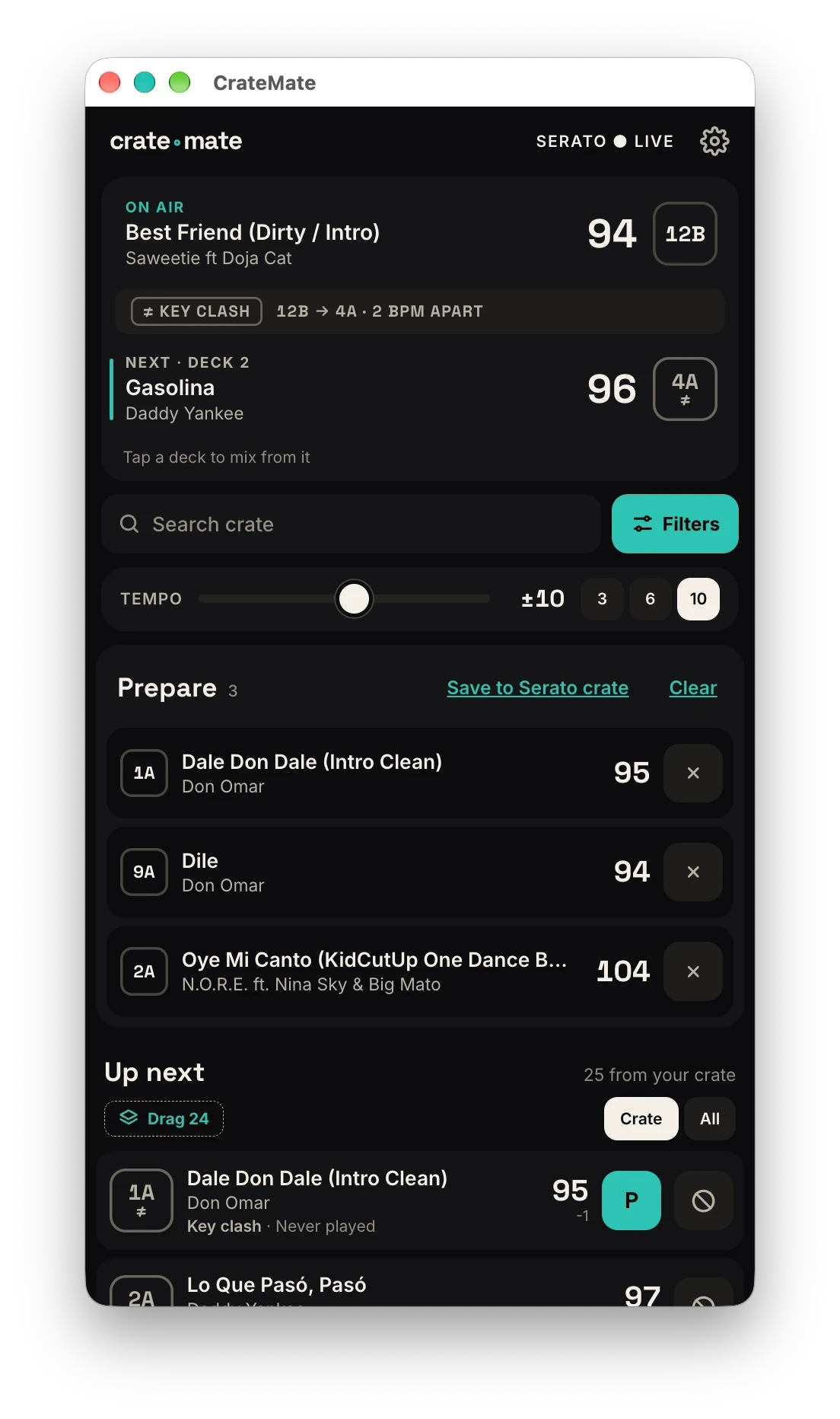
CrateMate reads your DJ software's history. With Serato it shows two decks: what's On Air and what you've just cued as Next. With rekordbox it shows the track you're playing, once rekordbox has logged it.
For open-format DJs · Mac beta
Long sets burn through the same songs. CrateMate sits beside Serato or rekordbox and brings back the ones you own but haven't played in a while, and shows you exactly when you last played each one.
Works with Serato DJ and rekordbox on Mac, together if you use both. Your library stays on your Mac.
How it works
Set up once. After that it just sits there, ready when you need an idea.
CrateMate reads your DJ software's history. With Serato it shows two decks: what's On Air and what you've just cued as Next. With rekordbox it shows the track you're playing, once rekordbox has logged it.
Serato can't tell which deck is audible, so you tap the one to mix from (rekordbox shows one track, so there's nothing to choose). Then choose how tight the tempo match should be.
Scan the list, check when you last played each song, then drag one onto a deck. Not for tonight, or ever? One tap sends it to Do Not Play.
A night with CrateMate
Open-format DJs play more, for longer, to crowds that want everything. Here's where it earns its place.
You've played this crowd all week. The next ten songs are already in your fingers, and most of them are the ones you played last night. It's not a bad set. It's just the same set.
The corporate crowd is up and you need new options without leaving the vibe. CrateMate lists songs you own that fit what's on, and each row shows when you last played it. Not played in months? Never played at all? That's the one to try. Tap P on the ones you like and they wait in your Prepare list, even after the suggestions move on.
Someone asks for a song you hadn't planned and it's nothing like what you were building. You play it, because that's the job. Now where do you go? Load it, tap the deck, and CrateMate suggests tracks with a similar vibe, so the night keeps flowing.
A song you bought years ago and never got round to playing. It fits, it's a left turn, and the room has never heard you play it. You drag it on and the floor reacts. That's the whole idea.
Not a replacement for your creativity. A reminder of everything you already have.
Prepare list
Tap P on any suggestion and it joins your Prepare list. The suggestions move on as you mix. Your shortlist doesn't.
Drag from it onto a deck when you're ready, or save it as a Serato crate to pick up next time.
Last played
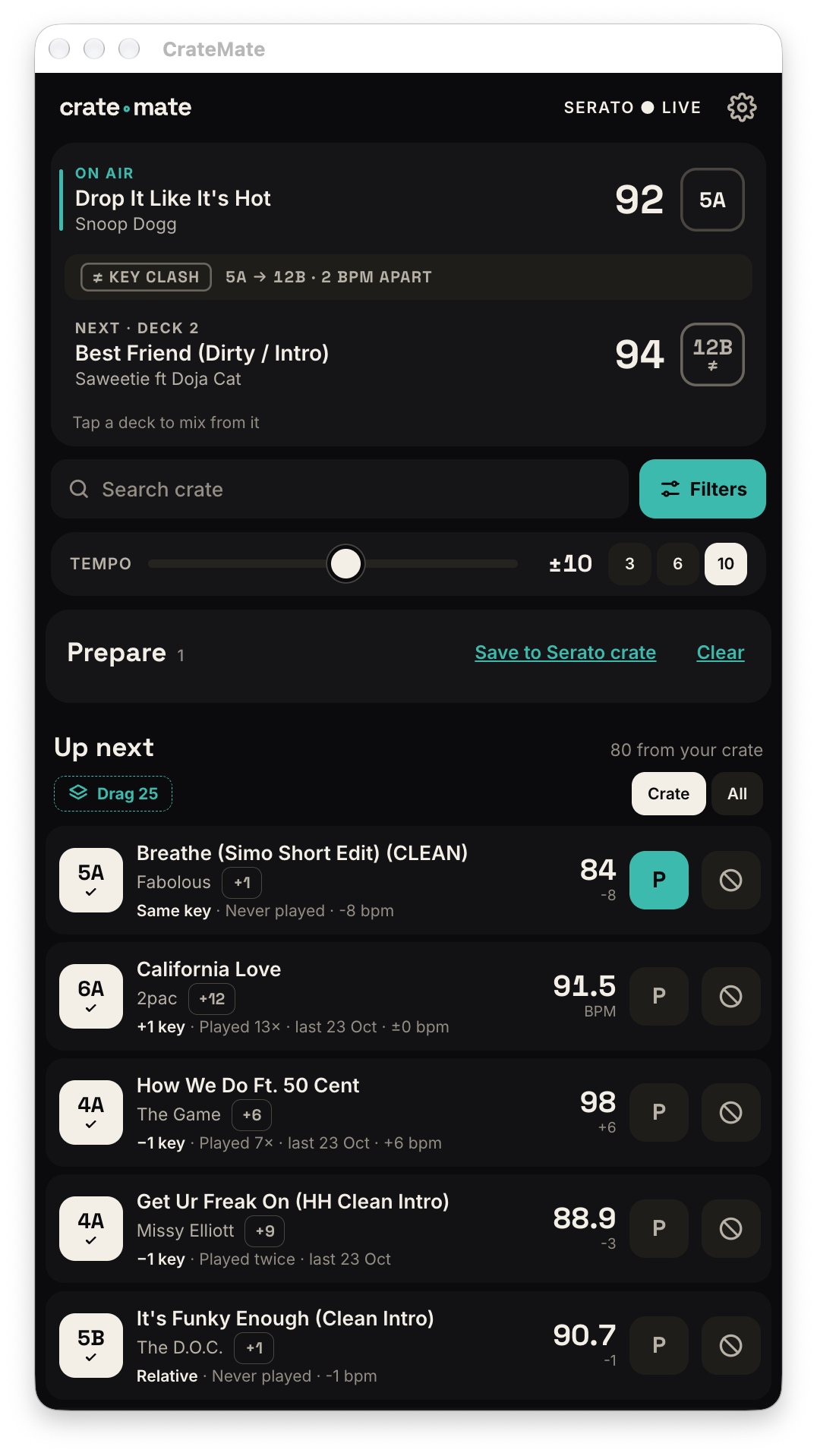
Not played in months, played twice, played every night this week. You see it before you drag it on, so you stop defaulting to the same songs.
The key rule
Once a song is in the right neighbourhood for vibe, the chips tell you if it will blend with the track you're about to mix into.
Same key, one step either way, or the relative major or minor. Safe to blend.
A deliberate lift. Plus two on the wheel, or a semitone change. You decide if tonight needs one.
The keys don't match. Plenty of DJs mix these on purpose, so they stay in the list, ranked after the keys that fit. Your ears, your call.
The window
A narrow window that sits above your DJ software. Big targets, built for a dark booth.
 ● Serato live
The track you're mixing out of, with time remaining. Its key chip stays neutral because there's nothing to compare it with.
The track you've just cued. Its chip shows whether the transition from On Air works: Fits, Energy shift or Key clash.
One line that answers "does what I've loaded actually work?" Key move, tempo lock or BPM difference.
Search your crate, then narrow the list by key and tempo range.
Key chip, title, and a meta line with the key move, BPM difference, how often you've played it and when you last did. Drag a row onto a Serato deck to load it, or tap P to keep it in your Prepare list.
One tap, no confirmation. The row collapses with a few seconds to undo, then that track is never suggested again.
Also in the box
From ±3 to ±16 BPM, right on the main screen. The list re-ranks instantly.
Show only what you own, or include ideas you don't have yet for crate-digging.
Pin a compact window above Serato or rekordbox so you never alt-tab mid-mix.
Dark for the booth, light for daytime sets, or follow your Mac's appearance.
Tap P on any suggestion to shortlist it. The list stays put while the suggestions change, and you drag from it onto a deck when you're ready.
Connect Lexicon through Claude Desktop and ask for playlists built from your own library.
Built by an open-format DJ
CrateMate started as a tool for James Campbell's own open-format sets: a 49,000-track library and a lot of long nights where the same favourites kept coming round. It's still tuned on real gigs, from Ibiza clubs to ships at sea.
Use both and CrateMate joins your libraries and follows whichever one you played a track in last. Other DJ software is planned, one reader at a time.
Invite-only beta
I'm letting DJs in a few at a time, so I can look after every tester. Tell me what you play on and I'll be in touch if you're picked.
Thanks. Check your inbox for a quick confirmation. If you're picked, I'll email you your access code.
FAQ
It's invite-only. Sign up and I'll pick testers in batches, then email you an access code and an invite to the testers' WhatsApp group. Access is free. Codes last 30 days, and I extend them while we're still testing.
Beta codes last 30 days, and I extend them while we're still testing. When the beta ends, your code stops working and you'll be able to choose a plan to carry on. Nothing is charged automatically.
Open-format DJs with big libraries and long sets: weddings, corporate gigs, residencies, ships, anywhere you play five hours and a bit of everything. Genre specialists can use it too, but that's who we're building for.
It starts from the track you pick, finds songs with a similar vibe, keeps the ones you own, then orders them by tempo and key. Each row shows how often and when you last played it.
By default it only shows tracks in your library. A toggle adds radio ideas you don't have yet, marked as not in your crate, for crate-digging.
Serato DJ and rekordbox today. VirtualDJ is next, then djay Pro. Each one needs its own reader, so there are no dates yet.
Yes. Turn on both in Settings. CrateMate joins the two libraries (a file both know shows once, and plays are added up) and follows whichever program you played a track in most recently, so there is nothing to switch on the night.
One setting. rekordbox only writes a track to its history after it has played for a set time, 60 seconds by default. Lower the Playback time in rekordbox's History settings (1 second works) and CrateMate sees each track almost as soon as it plays. CrateMate never changes rekordbox's settings itself. rekordbox also doesn't say which deck a track is on, so you see one On Air track rather than two decks.
No. It reads the folders you choose and keeps its own list on your Mac. Nothing in Serato or rekordbox is altered.
No. Your library stays on your Mac. To find similar music, CrateMate looks up only the track you're seeding from, not your collection.
Your library and the mixing maths are local. Suggestions you've already looked up are cached, so they still work offline. New lookups need a connection.
Not yet. The beta runs on Macs, both Apple Silicon and Intel. There's no Windows version yet.
The beta isn't notarised by Apple yet. Right-click the app, choose Open, and confirm once. You won't be asked again.